




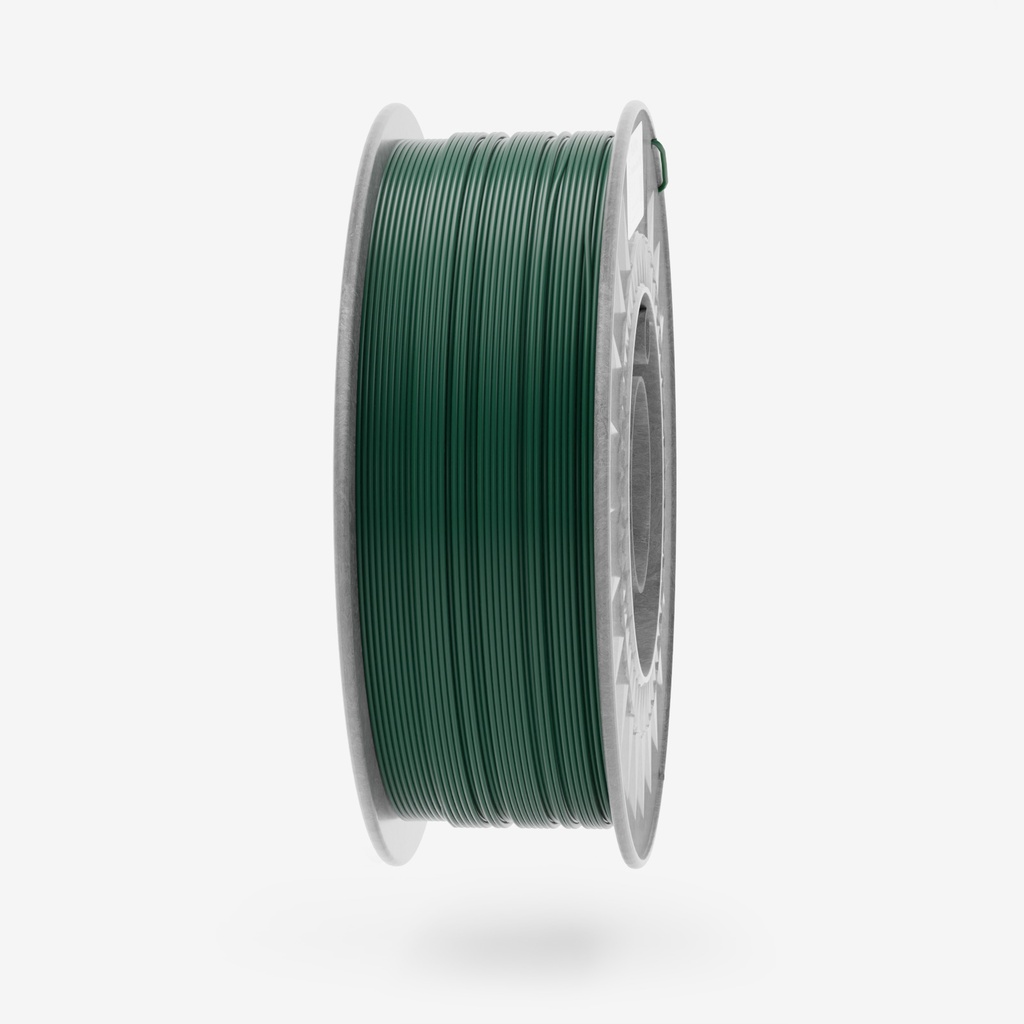
PLA Plus Moss Green 1kg – Premium 3D Printing Filament
PLA
Plus Moss Green combines the rugged durability of PLA Plus with a rich,
earthy green hue inspired by natural foliage. Designed for creators
seeking both resilience and a connection to nature, this filament
produces prints with a muted, organic aesthetic, perfect for outdoor
applications, camouflage designs, or projects that thrive in harmony
with the environment.
Key Benefits:
- Natural, Earthy Tone: The deep moss green shade mimics forest landscapes, ideal for stealthy designs, outdoor gear, or nature-inspired art.
- Enhanced Strength & Impact Resistance: PLA Plus outperforms standard PLA, offering toughness for functional parts exposed to stress, wear, or outdoor conditions.
- Smooth, Reliable Printing: Low warping, excellent layer adhesion, and compatibility with most 3D printers ensure consistent results for all skill levels.
- Eco-Friendly Formula: Made from biodegradable materials, aligning with sustainable practices for environmentally conscious creators.
Applications:
- Outdoor & Survival Gear: Craft camouflage accessories, hiking equipment, or protective cases for rugged environments.
- Botanical & Garden Designs: Print planters, garden markers, or decorative terrarium elements that blend seamlessly with nature.
- Military & Tactical Models: Ideal for realistic dioramas, toy soldiers, or scale models requiring authentic camouflage details.
- Architectural Landscapes: Enhance terrain models, eco-friendly building mockups, or park layouts with natural green accents.
- Artistic & Eco-Friendly Projects: Create sculptures, wall art, or eco-conscious consumer products with an organic aesthetic.
Ideal For:
- Functional prints needing durability and a discreet, natural appearance.
- Outdoor enthusiasts, modelers, or designers focused on nature-themed projects.
- Combining sustainability with performance in eco-aware creations.
- Enhancing prototypes, tools, or decor with a rugged, earthy finish.
PLA Plus Moss Green is the ultimate choice for bridging innovation and nature. Whether for stealth, function, or organic artistry, this filament empowers your 3D prints to thrive in both form and resilience!
| Colour | Moss Green |
| Weight | 1 kg |
| Diameter tolerance | < 0,02 mm |
| Diameter | 1,75 mm |
| Printing Temperature | 210-240°C |
| Bed Temperature | 0–60°C (prints well without a heated bed) |
| Printing Speed | 40-300 mm/s |
| Density | 1.24 g/cm³ |
| Heat resistance | up to 50°C |
PLA Plus (PLA+) – Print Settings
PLA Plus (PLA+) is an improved version of classic PLA, offering higher strength, better flexibility, and increased durability. To achieve the best printing results, it is essential to set the parameters correctly in the slicer software. For example, in OrcaSlicer https://orca-slicer.com/ for the Bambu Lab A1 Mini printer with a 0.4 mm nozzle.

Printing Temperature
Select the Printer Profile
These recommendations are for all BambuLab printers, as the most widely used printer. Professional and extra powerful printers need specific settings, especially max flow. For these cases please do not hesitate to contact us support.
1. Select the Printer Profile
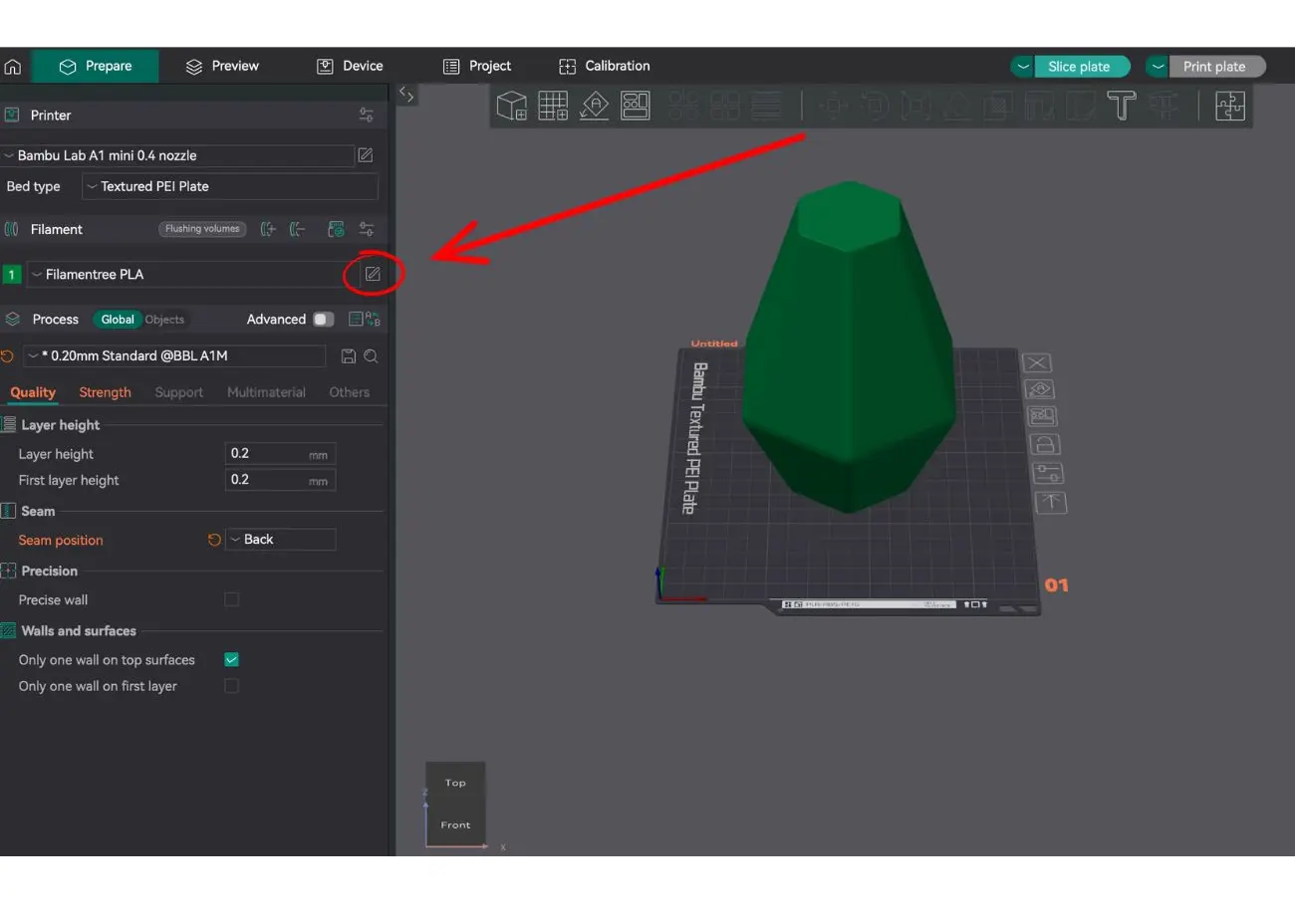
- In the top left corner, select Bambu Lap printer
- In the Bed type field, choose the appropriate bed type, such as Textured PEI Plate.
2. Edit Filament Settings
Click on the pencil icon next to the filament name (in our case, Filamentree PLA) to open the filament settings.
Bed Temperature
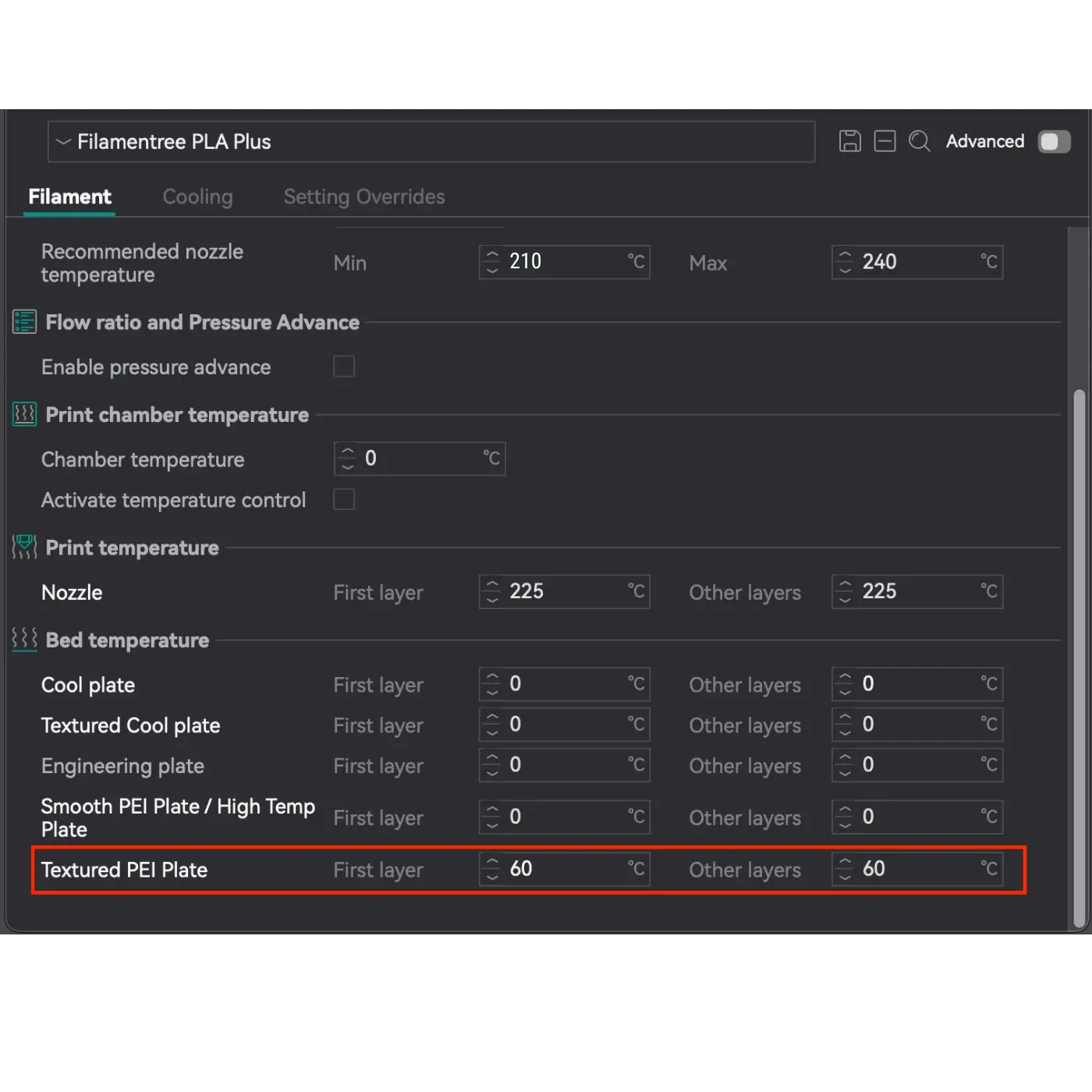
For Textured PEI Plate:
- First layer: 60°C
- Other layers: 60°C
The temperature is specifically set for the Textured PEI Plate as it provides excellent adhesion for PLA Plus at 60°C. For other types of plates (e.g., Cool Plate, Smooth Plate), the temperature remains at 0°C because they are not used in this configuration.
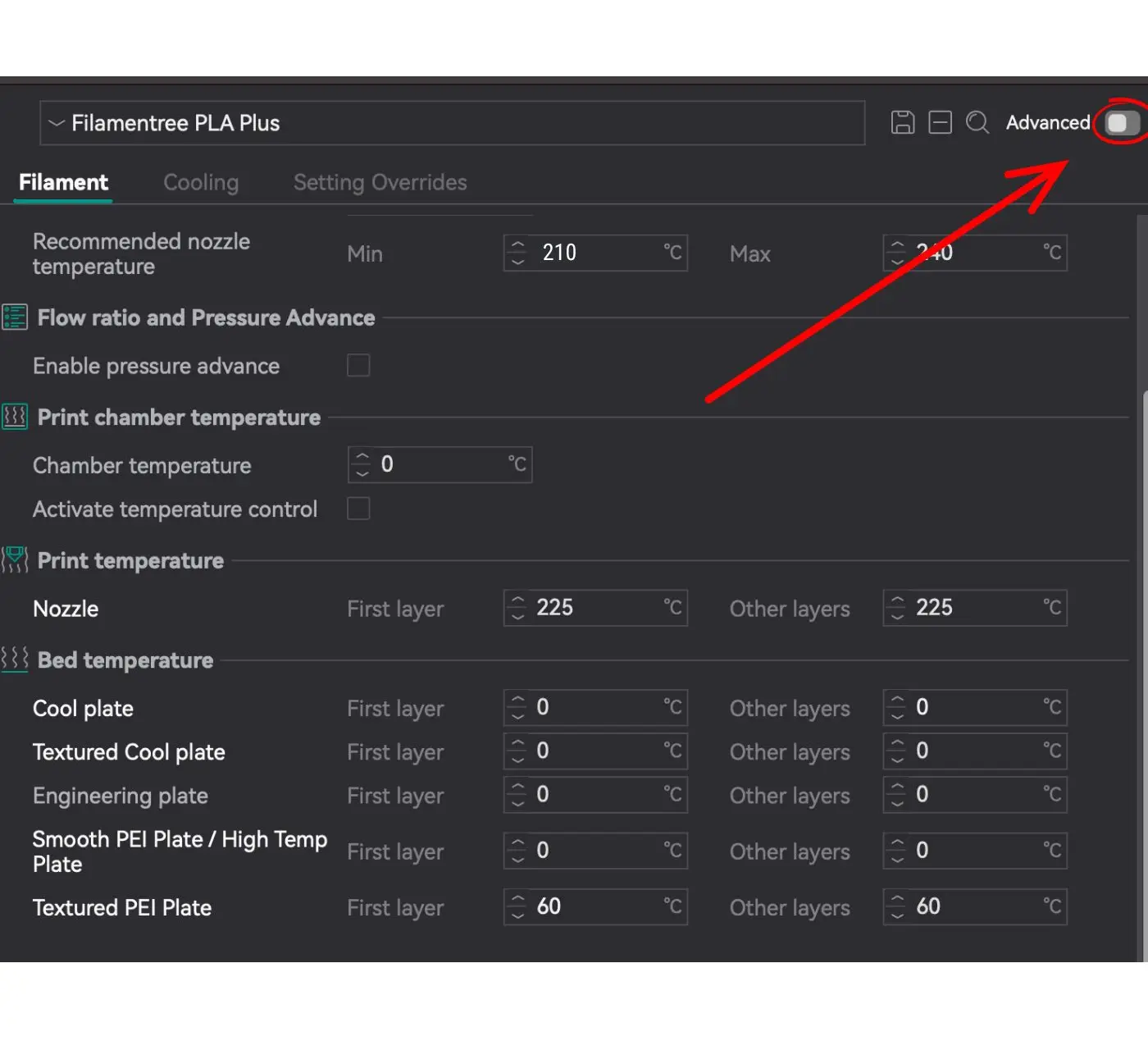
Edit Settings
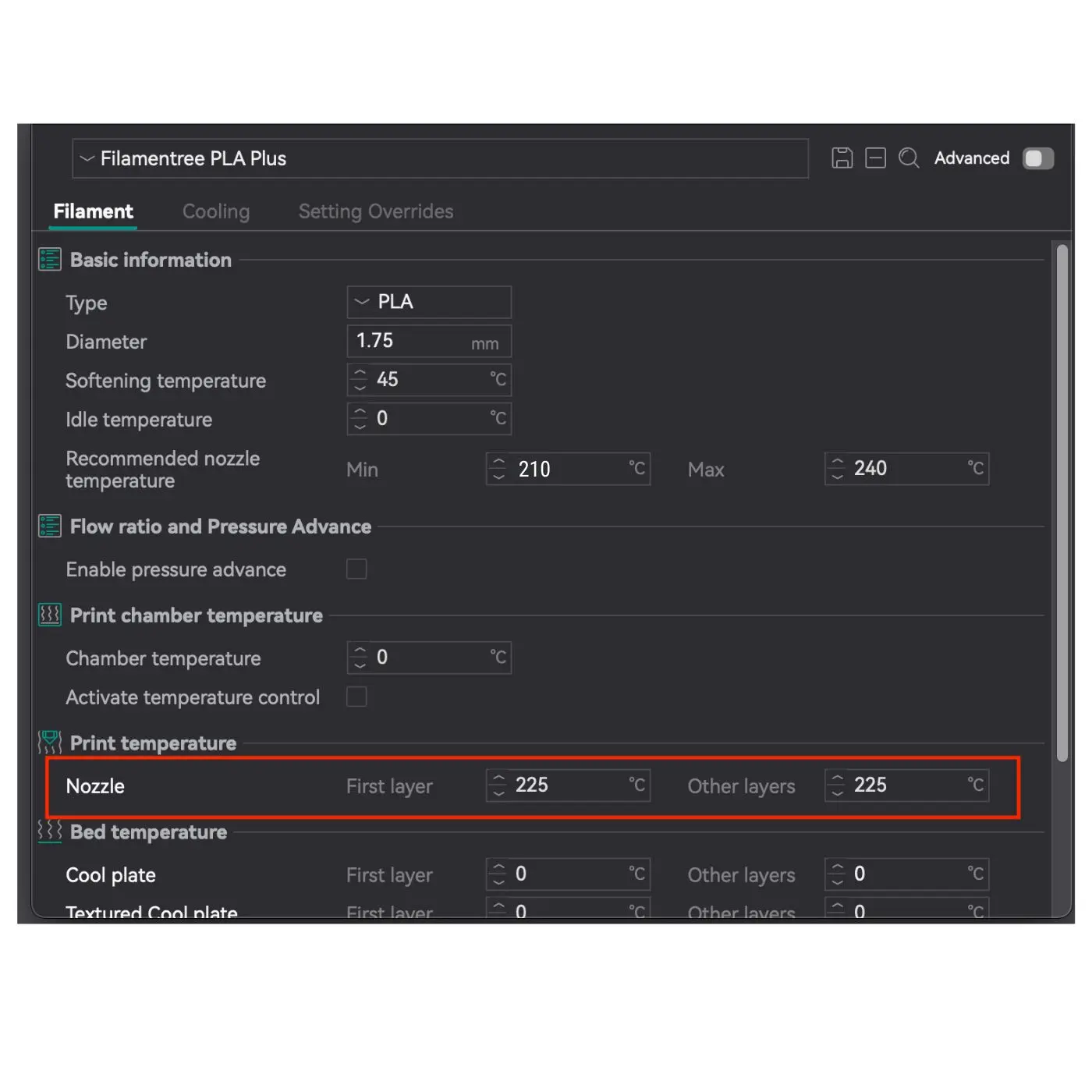
PLA+ requires a higher temperature than standard PLA, so it is important to find the optimal temperature for your filament.
📌 Where to set it?
1. Open OrcaSlicer
2. Go to Filament Settings
3. Recommended Nozzle Temperature: 210 – 240 °C
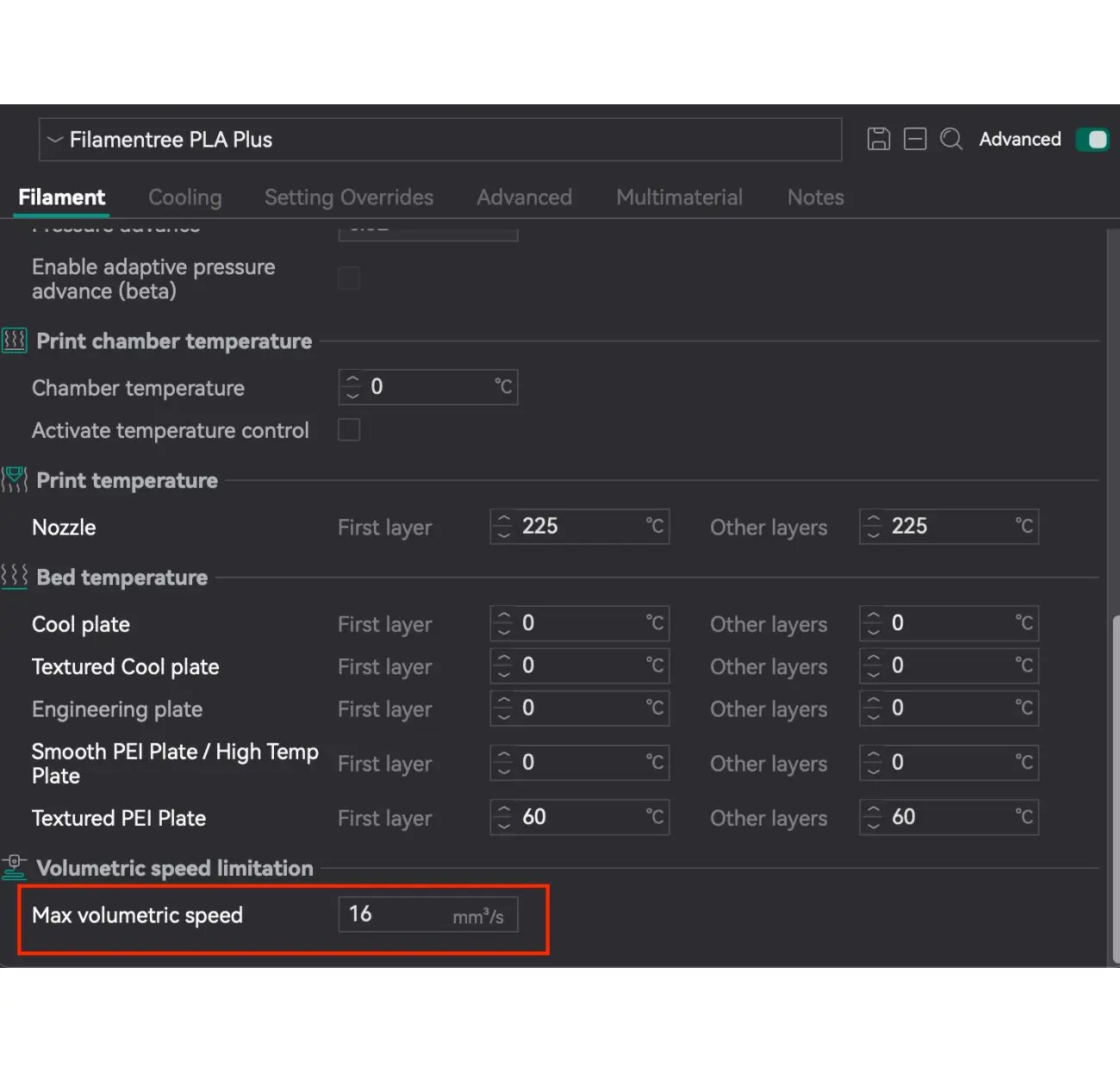
👉 The value 225 °C (as shown in the red box in the image) is the middle between 210 and 240 °C and is a universal recommendation for most prints.
Printing Temperature
Select the Printer Profile
These recommendations are for all BambuLab printers, as the most widely used printer. Professional and extra powerful printers need specific settings, especially max flow. For these cases please do not hesitate to contact us support.
1. Select the Printer Profile
- In the top left corner, select Bambu Lap printer
- In the Bed type field, choose the appropriate bed type, such as Textured PEI Plate.
2. Edit Filament Settings
Click on the pencil icon next to the filament name (in our case, Filamentree PLA) to open the filament settings.
Bed Temperature
For Textured PEI Plate:
- First layer: 60°C
- Other layers: 60°C
The temperature is specifically set for the Textured PEI Plate as it provides excellent adhesion for PLA Plus at 60°C. For other types of plates (e.g., Cool Plate, Smooth Plate), the temperature remains at 0°C because they are not used in this configuration.
Edit Settings
PLA+ requires a higher temperature than standard PLA, so it is important to find the optimal temperature for your filament.
📌 Where to set it?
1. Open OrcaSlicer
2. Go to Filament Settings
3. Recommended Nozzle Temperature: 210 – 240 °C
👉 The value 225 °C (as shown in the red box in the image) is the middle between 210 and 240 °C and is a universal recommendation for most prints.
Max Volumetric Speed
In OrcaSlicer settings, Max Volumetric Speed limits the maximum volume of filament that can be extruded through the nozzle per second. This is a critical parameter that affects print quality and helps avoid issues with filament feeding.
What does this parameter mean?
- Max Volumetric Speed (MVS): Limits the rate of filament extrusion in mm³/s.
- If the value is exceeded, the extruder may struggle to feed the filament, which can lead to:
- Under-extrusion (insufficient material is deposited).
- Decreased surface quality and detail precision.
- Missed steps or damage to the extruder’s feed gears.
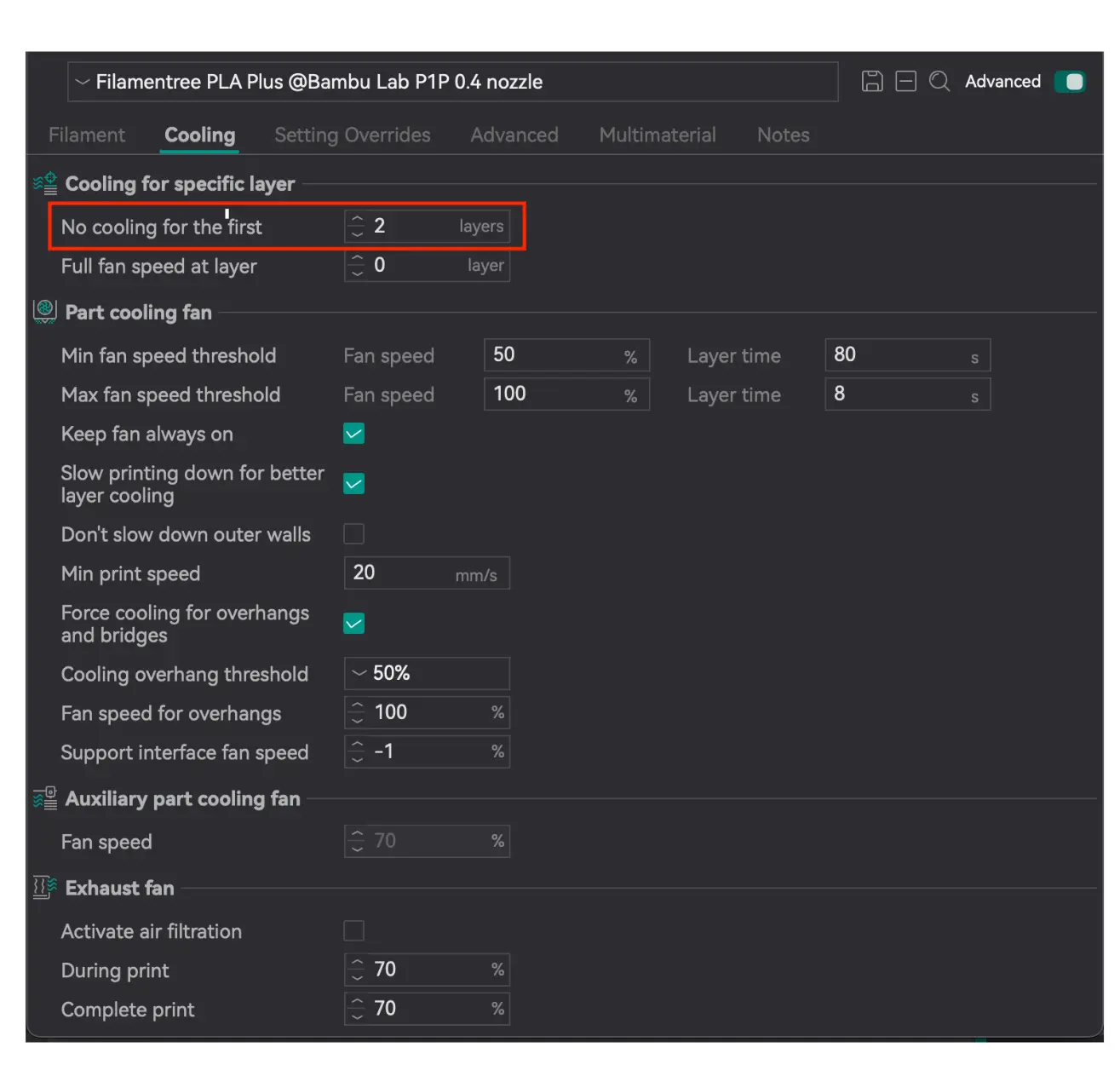
Cooling for specific layer
Setting the No cooling for the first parameter is critically important to ensure:
- Reliable adhesion of the model to the print bed: PLA Plus, like any other thermoplastic, requires good adhesion to the print bed for successful printing. If cooling is enabled on the first layers, it may result in insufficient material melting and the model detaching from the print bed.
- Avoidance of deformation or delamination of the base layers: Setting it to 2 layers provides sufficient time for the foundation to stabilize without the risk of deformation or delamination.
- A smooth transition to the cooling mode, which helps maintain high print quality throughout the process: It helps maintain overall print quality by ensuring proper adhesion of subsequent layers and compliance with the desired model standards.
This setting is standard for PLA Plus as it accounts for its thermal properties and provides optimal conditions for stable printing.
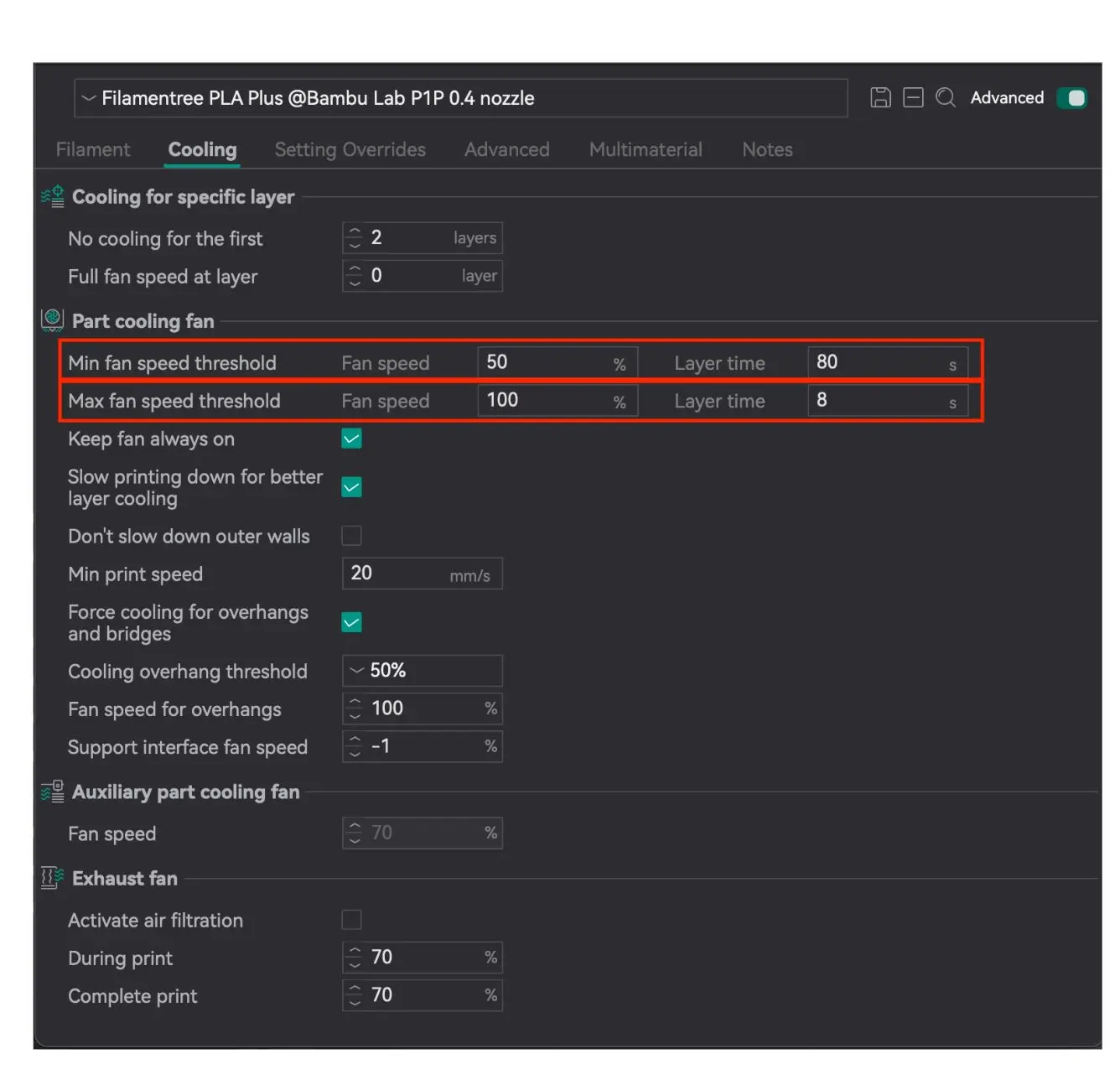
Part cooling fan
- Minimum layer time: 80 seconds (with fan speed at 50%)
Fan at 50%: This is the optimal speed for gradual cooling without excessive drying of the material.
- Maximum layer time: 8 seconds (with fan speed at 100%)
Advantage: 100% fan speed helps quickly cool large layers and ensures their stability before the next layer is applied.
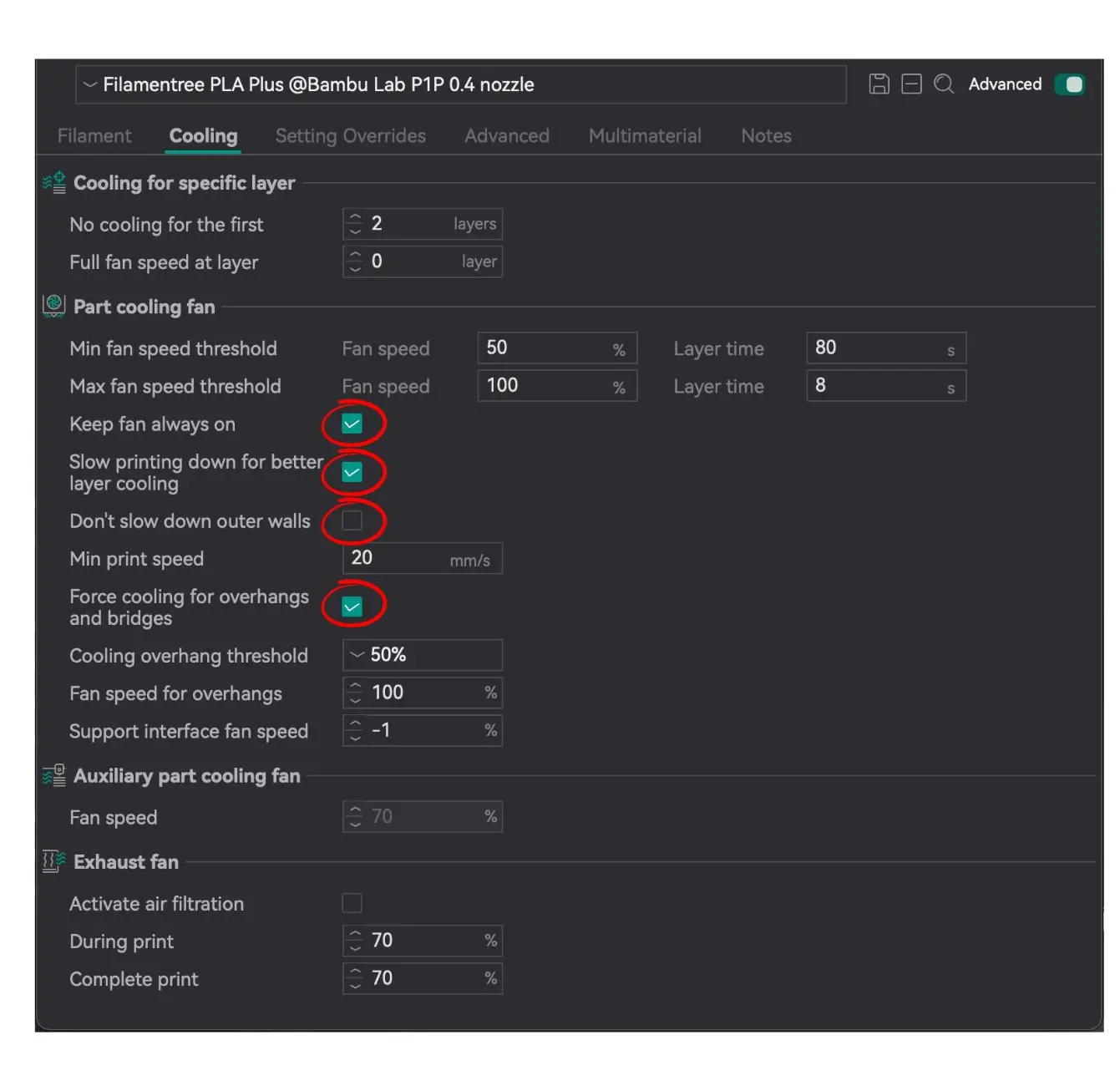
Always on:
✔️ Keep fan always on
✔️ Slow printing down for better layer cooling
✔️ Force cooling for overhangs and bridges
Always off:
✖️ Don’t slow down outer walls
Part cooling fan
- Minimum layer time: 80 seconds (with fan speed at 50%)
Fan at 50%: This is the optimal speed for gradual cooling without excessive drying of the material.
- Maximum layer time: 8 seconds (with fan speed at 100%)
Advantage: 100% fan speed helps quickly cool large layers and ensures their stability before the next layer is applied.
Always on:
✔️ Keep fan always on
✔️ Slow printing down for better layer cooling
✔️ Force cooling for overhangs and bridges
Always off:
✖️ Don’t slow down outer walls
Using the correct printing parameters for PLA Plus is critically important for achieving high-quality results. PLA Plus, as an improved version of standard PLA, requires precise settings to optimize its properties. Following the recommended settings allows you to fully leverage the benefits of PLA Plus, ensuring strong, aesthetically appealing, and durable prints.