





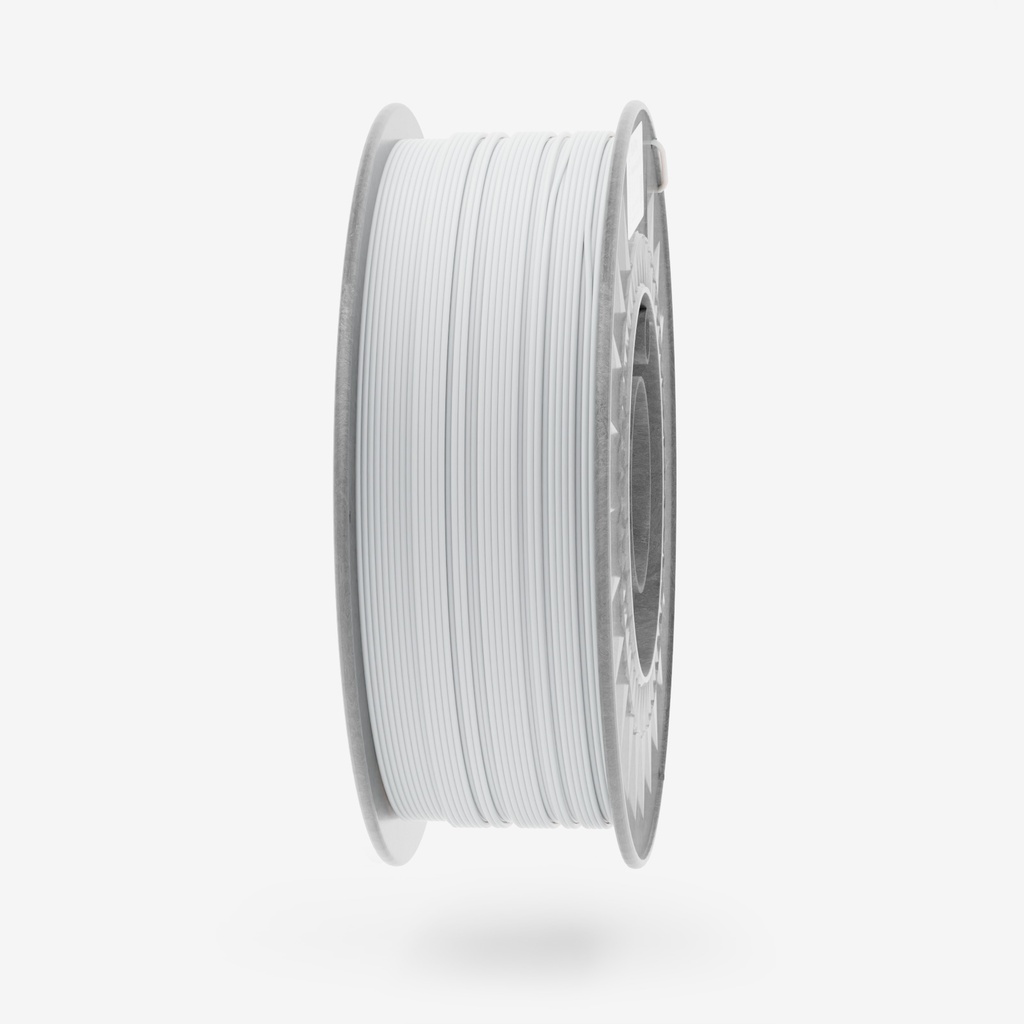
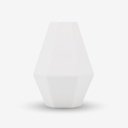
PLA Blaster Pure White 1kg Filament
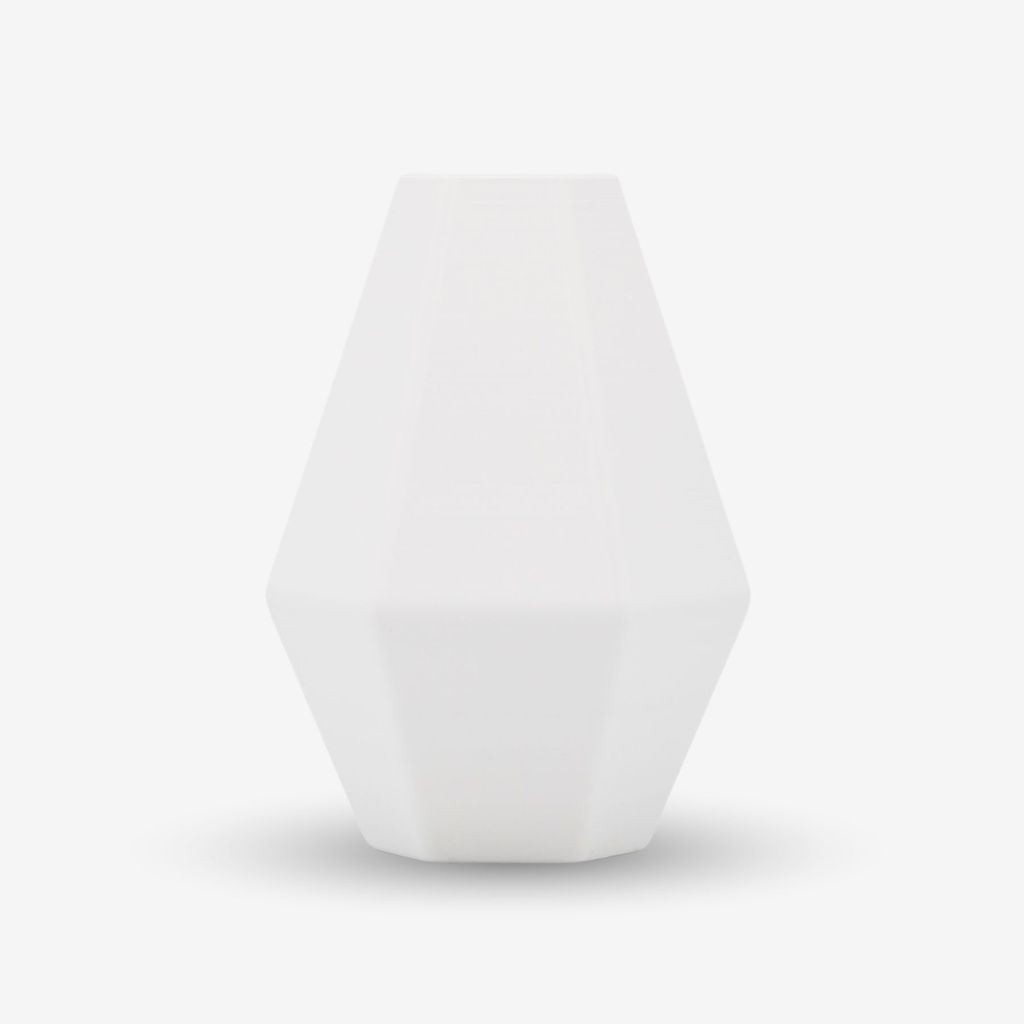
Create clean, elegant, and visually striking designs with PLA Blaster Pure White – a premium filament crafted for maximum purity, precision, and professional aesthetics. This snow-white material is perfect for creators who value clean details, refined lines, and versatile performance without compromising on quality or reliability.
Key Features:
- Matte, opaque finish: Achieve a smooth, uniform white surface without gloss – ideal for minimalist designs, architectural models, or prints intended for post-processing and painting.
- Balanced strength and stiffness: PLA Blaster offers the ideal blend of rigidity and ease of printing – delivering high dimensional accuracy and excellent layer adhesion.
- Aesthetic and functional: Its pure white tone gives prints a polished, professional look, while its printing stability ensures minimal warping.
- Eco-friendly composition: Made from biodegradable, plant-based materials, supporting sustainable 3D printing practices.
-
Effortless processing: Odorless, low risk of nozzle clogging, and excellent bed adhesion – perfect for everyday use and creative applications alike.
Applications:
- Architectural & product models: A great choice for designs requiring clean lines and precise features.
- Design & decor: Modern interior elements, stylish accessories, or personalized gifts – all with a timeless white foundation.
- Educational & display models: Smooth surface and printability make it ideal for schools, universities, and museums.
- Prototypes & functional parts: Combines visual appeal with reliability for testing forms, fits, and functional performance.
-
Artistic projects: Perfect for painting, hand-finishing, or figurines where the white base serves as a creative canvas.
Why Choose PLA Blaster Pure White?
This filament strikes the perfect balance between visual aesthetics and technical reliability. Its pure matte white finish enhances every detail while providing an ideal base for customization. Whether you’re printing design pieces, functional components, or expressive artwork, PLA Blaster Pure White delivers clean, consistent results.
| Colour | Pure White |
| Weight | 1 kg |
| Diameter tolerance | < 0,05 mm |
| Diameter | 1,75 mm |
| Printing Temperature | 230-240°C |
| Bed Temperature | 40-60°C |
| Printing Speed | 40-300 mm/s |
| Density | 1.24 g/cm³ |
| Heat resistance | up to 110°C |
PLA Blaster – Print Settings
PLA Blaster is an improved version of classic PLA, offering higher strength, better durability, and excellent mechanical properties. To achieve optimal printing results, it is important to set the parameters correctly in the slicer software. For example, in OrcaSlicer https://orca-slicer.com/ for the Bambu Lab A1 Mini printer with a 0.4 mm nozzle.

Printing Temperature
Select the Printer Profile
These recommendations are for all BambuLab printers, as the most widely used printer. Professional and extra powerful printers need specific settings, especially max flow. For these cases please do not hesitate to contact us support.
1. Select the Printer Profile
- In the top left corner, select Bambu Lap printer
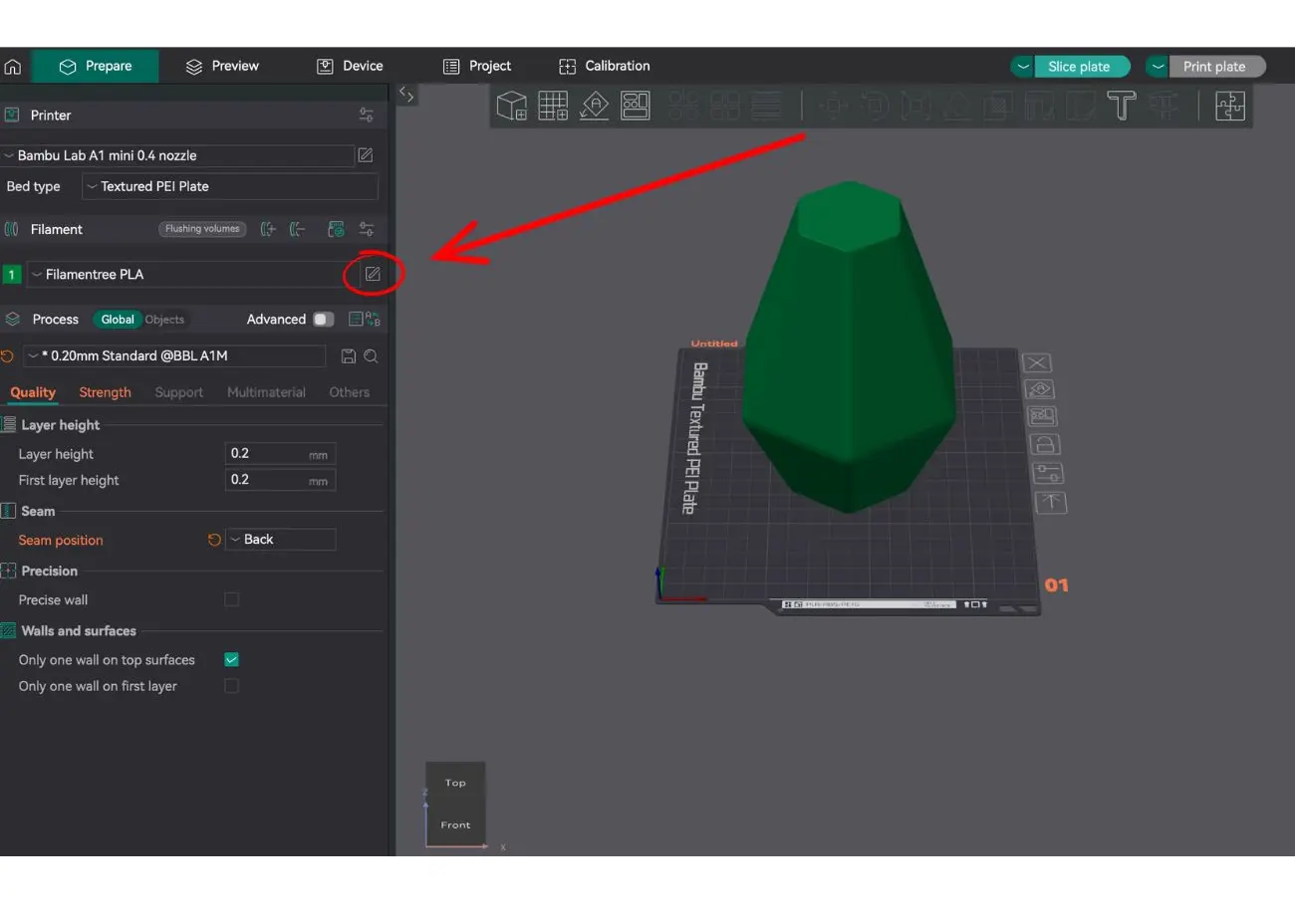
- In the Bed type field, choose the appropriate bed type, such as Textured PEI Plate.
2. Edit Filament Settings
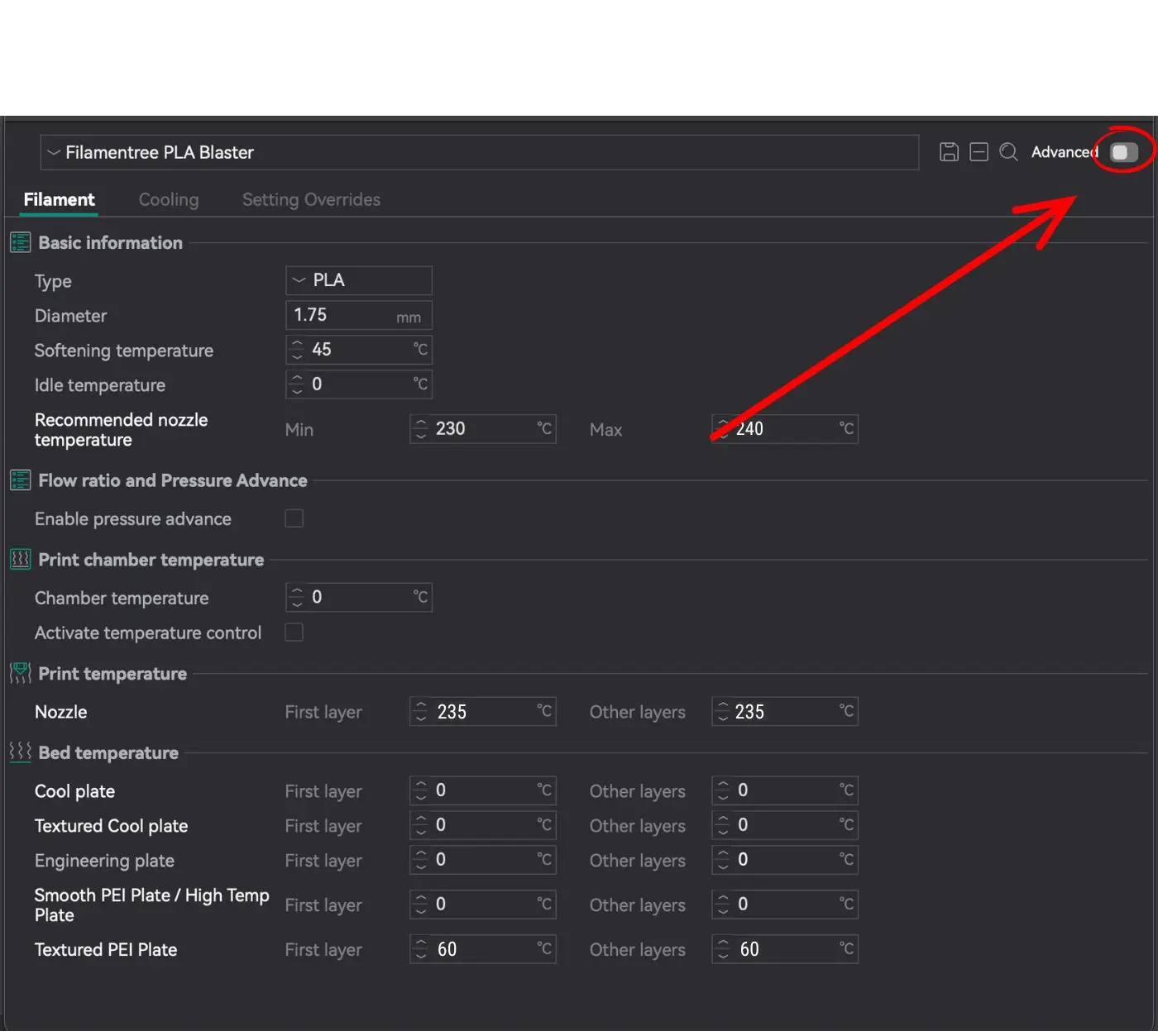
Click on the pencil icon next to the filament name (in our case, Filamentree PLA) to open the filament settings.
Bed Temperature
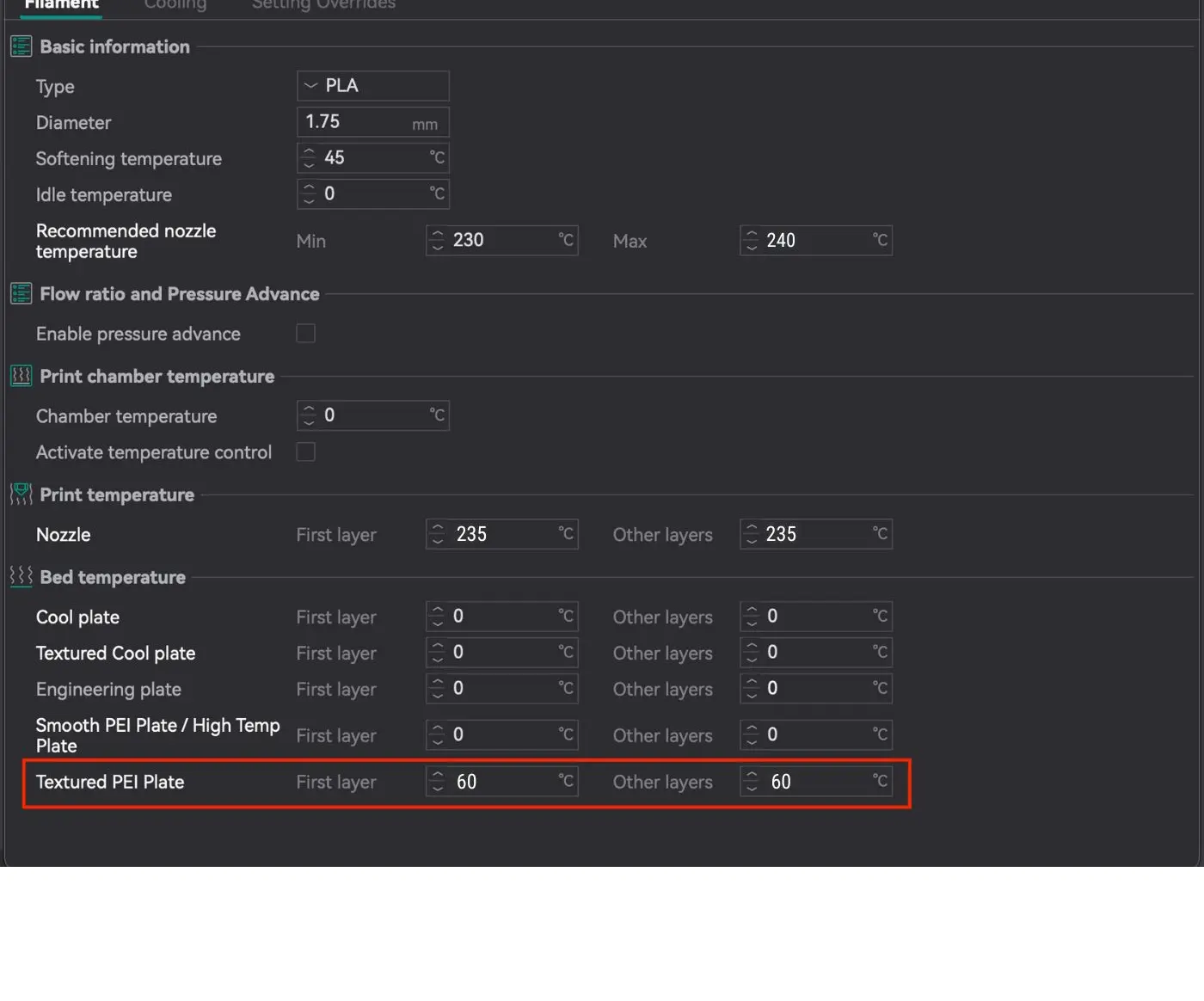
For Textured PEI Plate:
- First layer: 60°C
- Other layers: 60°C
The temperature is specifically set for the Textured PEI Plate as it provides excellent adhesion for PLA Blaster at 60°C. For other types of plates (e.g., Cool Plate, Smooth Plate), the temperature remains at 0°C because they are not used in this configuration.
Edit Settings
PLA Blaster requires a higher printing temperature than standard PLA, so fine-tuning the temperature settings is key to unlocking its full strength and durability.
📌 Where to set it?
1. Open OrcaSlicer
2. Go to Filament Settings
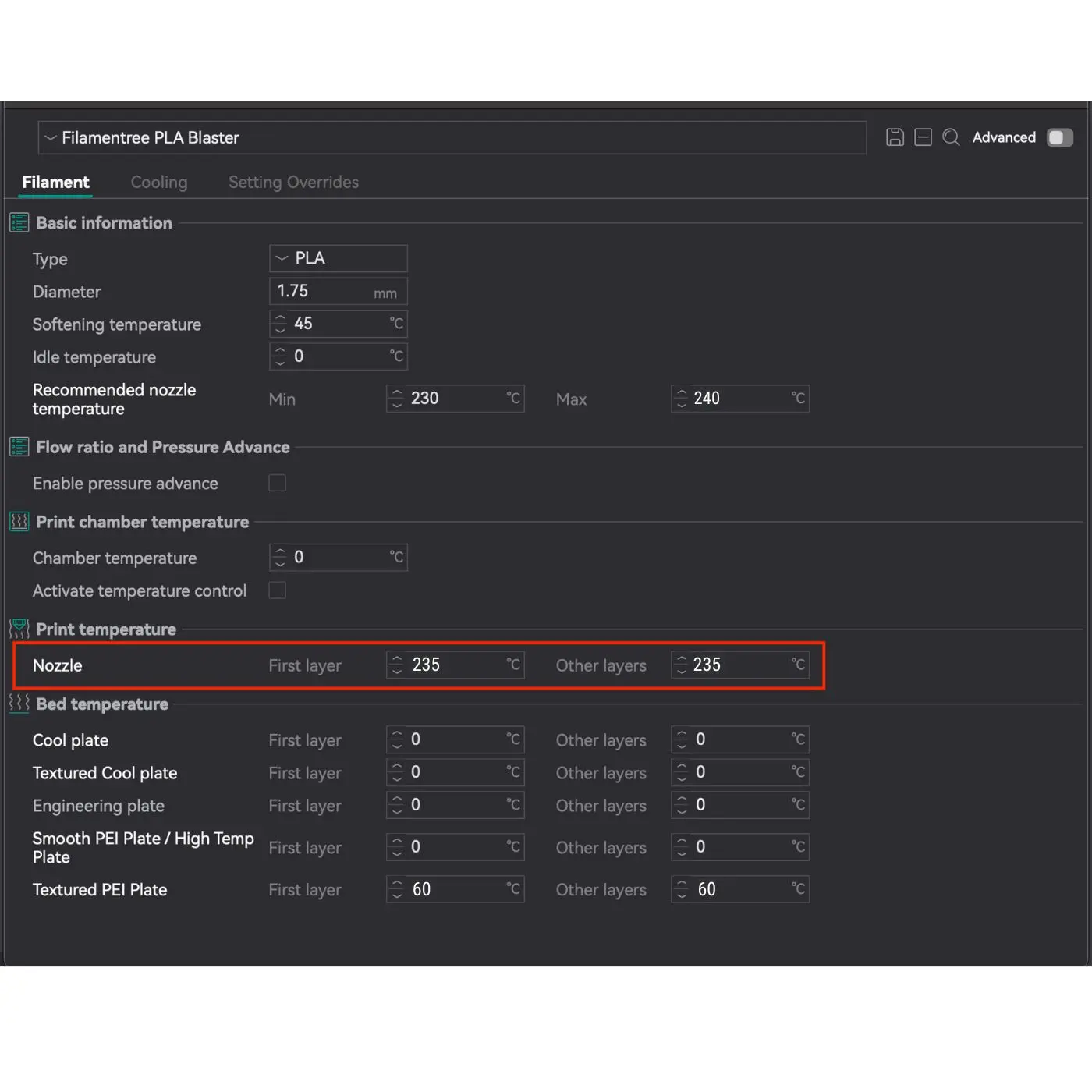
3. Recommended Nozzle Temperature: 230 – 240 °C
👉 The value 235 °C (as shown in the red box in the image) is the middle between 230 and 240 °C and is a universal recommendation for most prints.
Printing Temperature
Select the Printer Profile
These recommendations are for all BambuLab printers, as the most widely used printer. Professional and extra powerful printers need specific settings, especially max flow. For these cases please do not hesitate to contact us support.
1. Select the Printer Profile
- In the top left corner, select Bambu Lap printer
- In the Bed type field, choose the appropriate bed type, such as Textured PEI Plate.
2. Edit Filament Settings
Click on the pencil icon next to the filament name (in our case, Filamentree PLA) to open the filament settings.
Bed Temperature
For Textured PEI Plate:
- First layer: 60°C
- Other layers: 60°C
The temperature is specifically set for the Textured PEI Plate as it provides excellent adhesion for PLA Blaster at 60°C. For other types of plates (e.g., Cool Plate, Smooth Plate), the temperature remains at 0°C because they are not used in this configuration.
Edit Settings
PLA Blaster requires a higher printing temperature than standard PLA, so fine-tuning the temperature settings is key to unlocking its full strength and durability.
📌 Where to set it?
1. Open OrcaSlicer
2. Go to Filament Settings
3. Recommended Nozzle Temperature: 230 – 240 °C
👉 The value 235 °C (as shown in the red box in the image) is the middle between 230 and 240 °C and is a universal recommendation for most prints.
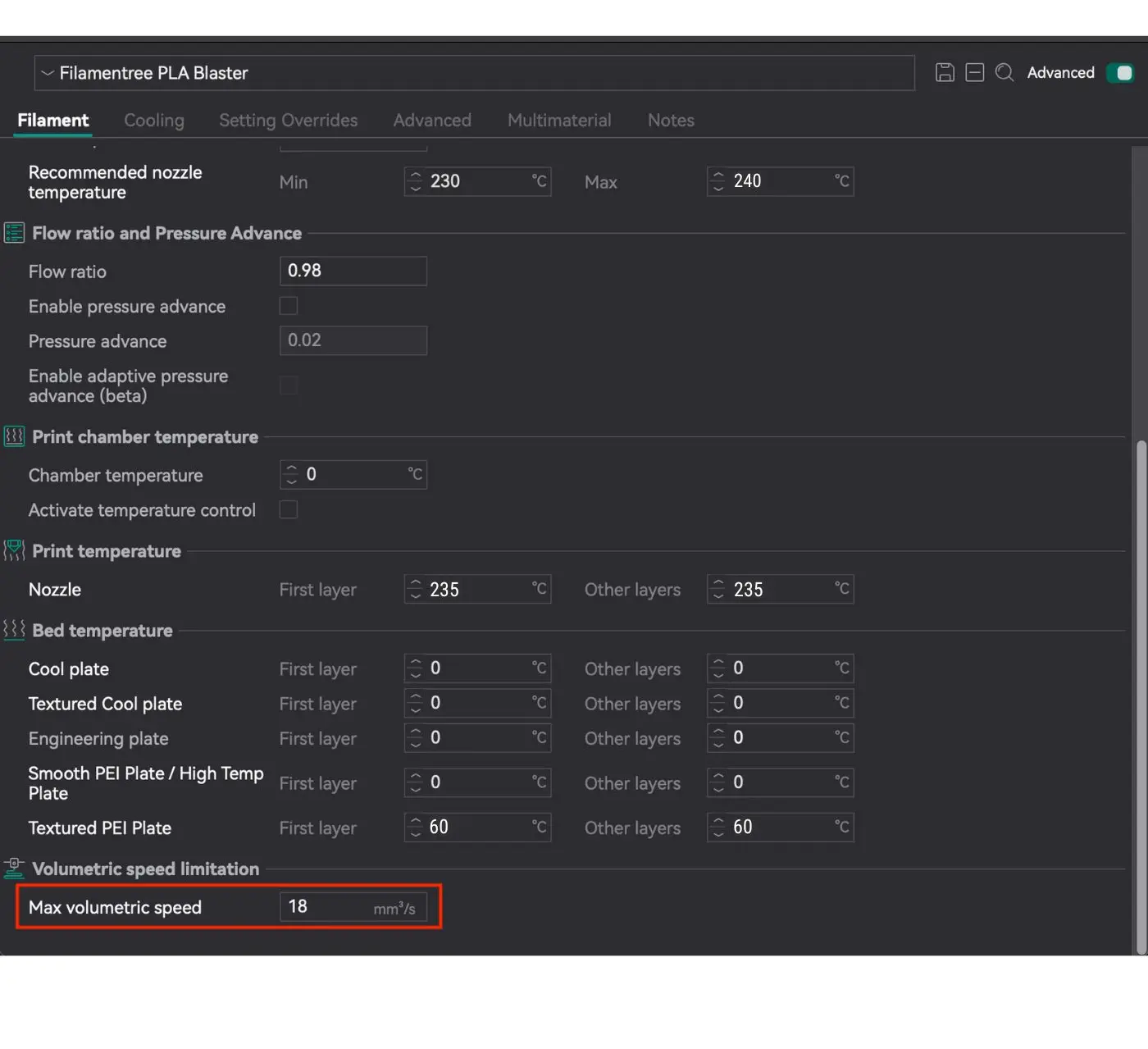
Max Volumetric Speed
In OrcaSlicer settings, Max Volumetric Speed limits the maximum volume of filament that can be extruded through the nozzle per second. This is a critical parameter that affects print quality and helps avoid issues with filament feeding.
What does this parameter mean?
- Max Volumetric Speed (MVS): Limits the rate of filament extrusion in mm³/s.
- If the value is exceeded, the extruder may struggle to feed the filament, which can lead to:
- Under-extrusion (insufficient material is deposited).
- Decreased surface quality and detail precision.
- Missed steps or damage to the extruder’s feed gears.
Cooling for specific layer
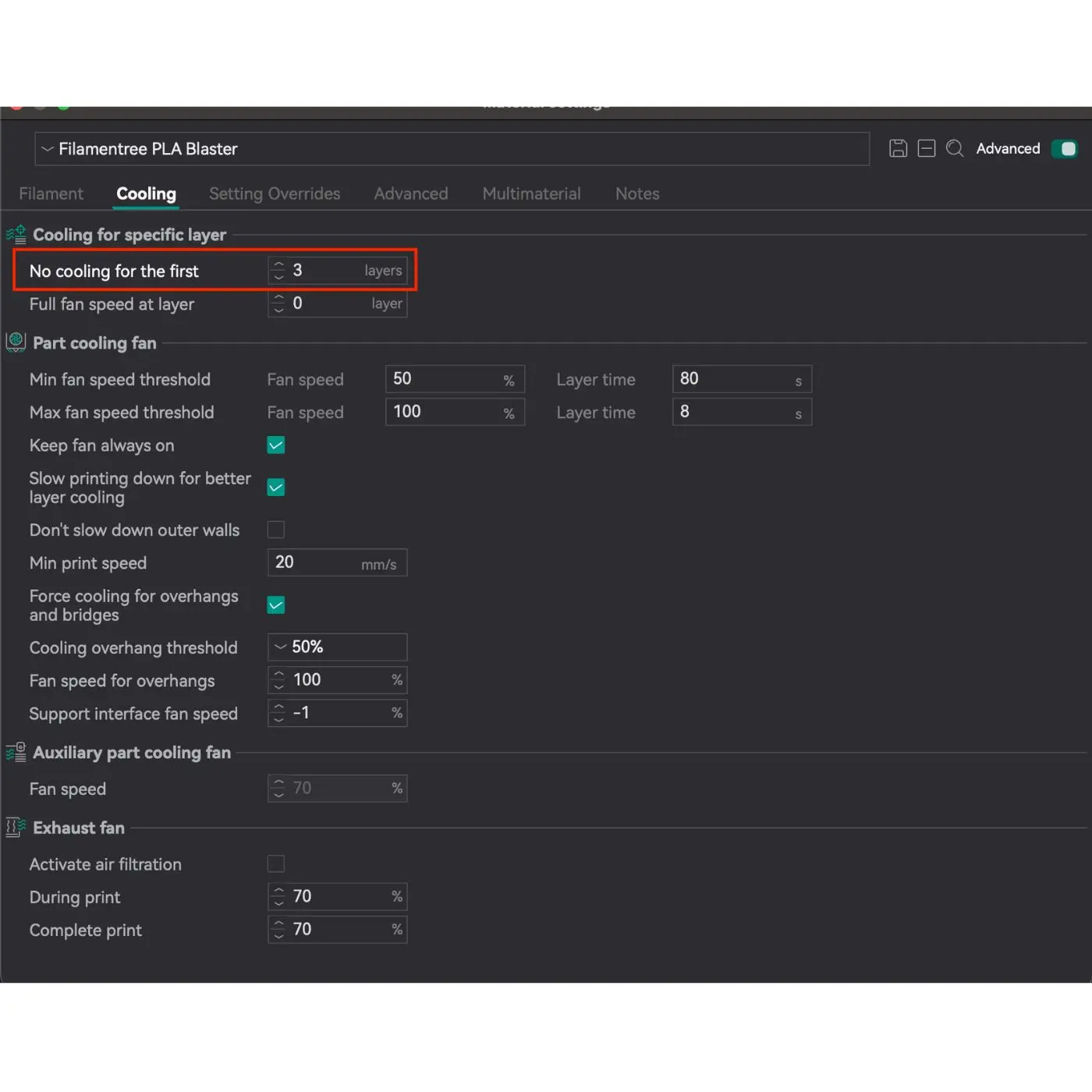
Setting the No cooling for the first parameter is critically important to ensure:
- Strong adhesion to the print bed: Like other high-performance PLA variants, PLA Blaster requires a solid foundation to prevent warping or detachment. Disabling cooling for the first layers allows proper fusion with the build surface.
- Prevention of warping or delamination: Keeping the cooling off for the first 3 layers gives the base layers time to stabilize, reducing the risk of deformation.
- A smooth transition to full cooling mode: This gradual cooling approach helps maintain consistent layer bonding and enhances overall print quality.
This setting is standard for PLA Blaster, as it takes into account its thermal properties and ensures optimal conditions for stable and reliable printing.
Part cooling fan
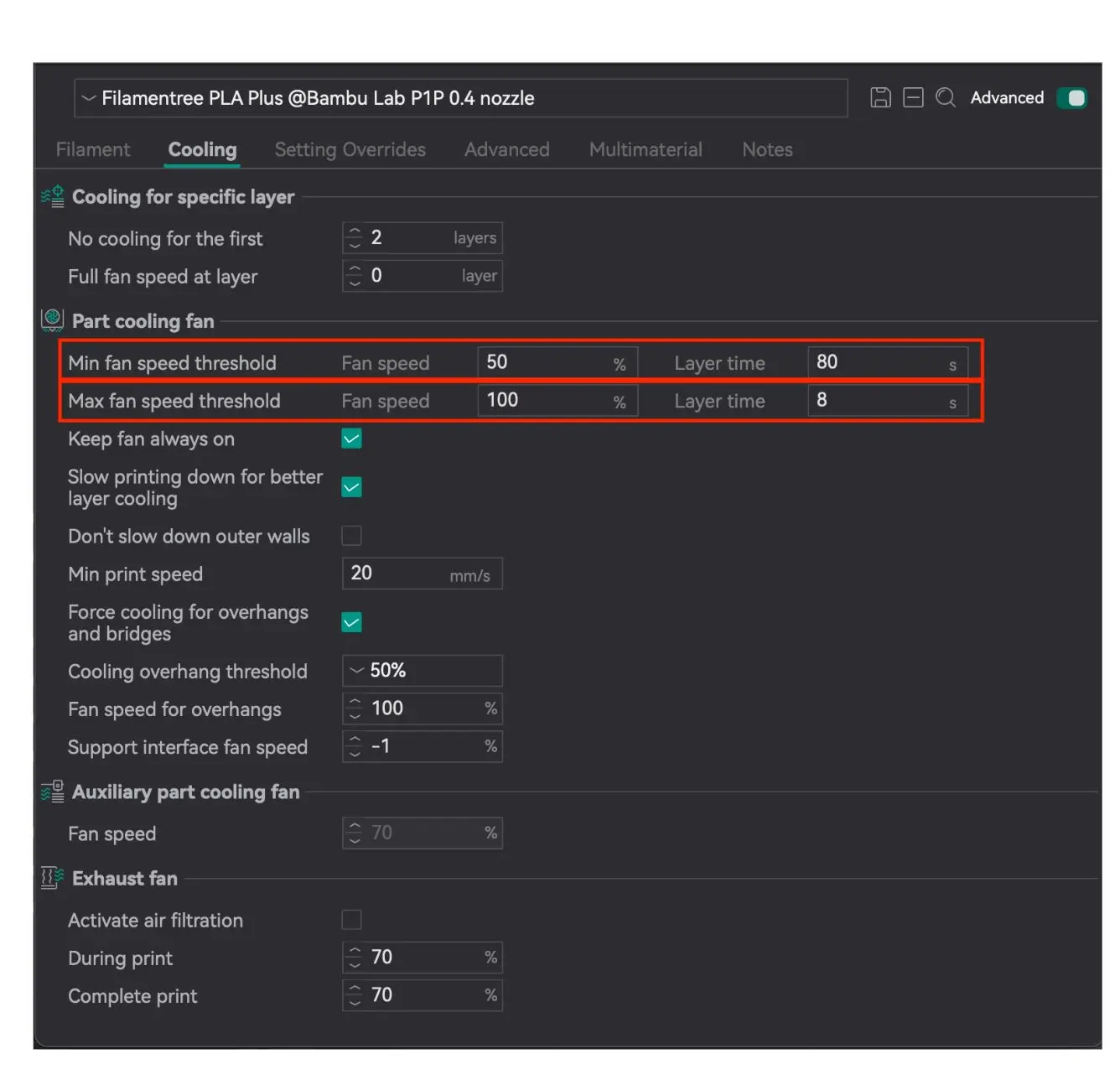
- Minimum layer time: 80 seconds (with fan speed at 50%)
Fan at 50%: This is the optimal speed for gradual cooling without excessive drying of the material.
- Maximum layer time: 8 seconds (with fan speed at 100%)
Advantage: 100% fan speed helps quickly cool large layers and ensures their stability before the next layer is applied.
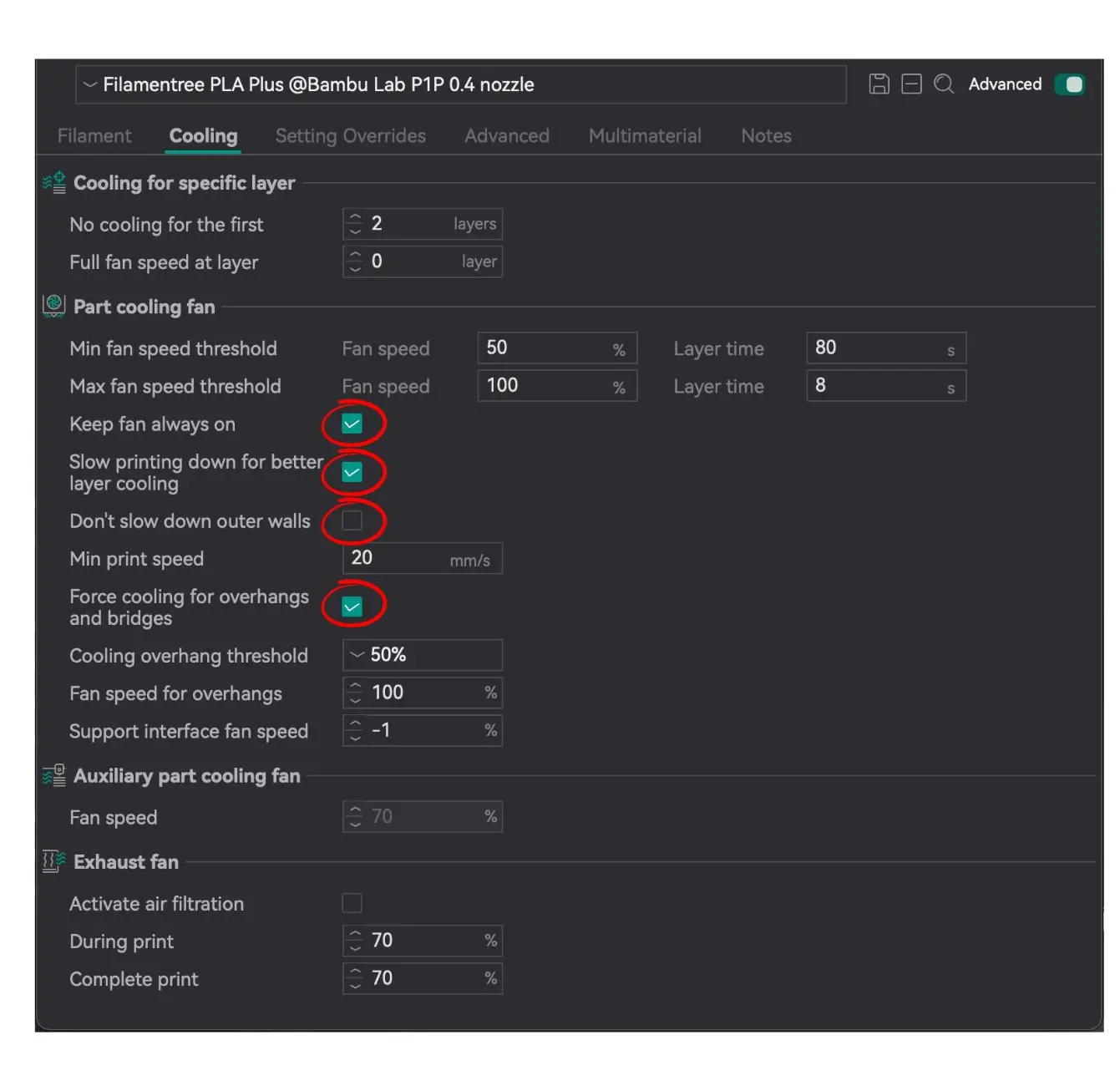
Always on:
✔️ Keep fan always on
✔️ Slow printing down for better layer cooling
✔️ Force cooling for overhangs and bridges
Always off:
✖️ Don’t slow down outer walls
Using the correct printing parameters for PLA Blaster is essential for achieving high-quality results. As an enhanced version of standard PLA, PLA Blaster requires precise settings to fully optimize its advanced properties. By following the recommended settings, you can take full advantage of its increased strength, durability, and excellent print quality, ensuring reliable and visually appealing prints.